


I’m not a software developer. I have worked with them for 30 years, which gives me some insight into what production grade software looks like. But it’s taken me a while to wrangle Claude Code to get there.
We’re still not 100% there. I’m constantly iterating on my workflow and setup.
That’s one of the key lessons learned: expect to spend 20-30% of your time improving your workflow, not writing code for your product.
This work is critical. Without it you’ll be caught in a near-endless loop of prompt-response, prompt-response, prompt-response. At best, you’ll launch cool demos.
If you’re interested in what I’m building, check out Candor: a synthetic user research platform. We’re looking for a few design partners right now. I share more about it here.
This post isn’t for Claude Code vibe coding experts or actual software developers. I’m definitely still learning (a lot), and I’m far from an expert.
Claude Code declares victory prematurely
The more I worked with Claude Code, the more I realized it was eager to declare things complete, even if they weren’t.
The gap between “the AI says it’s done” and “the thing actually does what I want” is the most frustrating part of building software with an AI agent.
When it works, it’s amazing and you can move faster than ever before. When it declares victory early, it feels like managing an over-eager junior who says “yep, all set” before checking their own work.
Initially, I tried fixing this the obvious way. Better prompts. More detail up front. Robust PRDs. “Make sure you do X and Y and don’t forget Z.” It helped a little. It did not solve the problem.

As fun and easy as it is to prompt Claude Code to do stuff and watch it (partially) work, I knew I needed more process and rigor to build quality software.
The fix: write the test before the work
The real problem was never the prompt. The problem was that nobody defined what “done” meant before the work started. So the AI got to decide, after the fact, whether it succeeded. And it almost always decides yes.
So I flipped the order.
Before Claude writes a single line of code on anything non-trivial, it has to write down what “done” looks like. Not vaguely. Three to five specific, pass-or-fail checks. It’s my task rubric.
If the task is “add rate limiting to our API,” the rubric might be: requests over the limit return the right error, the limit is configurable without a redeploy, internal traffic is exempt, the counter survives a restart, and nothing else in the app breaks. Each one is a yes or a no. No “kind of.” No “looks good.”
Here’s an example task rubric (not for the rate limiting feature):
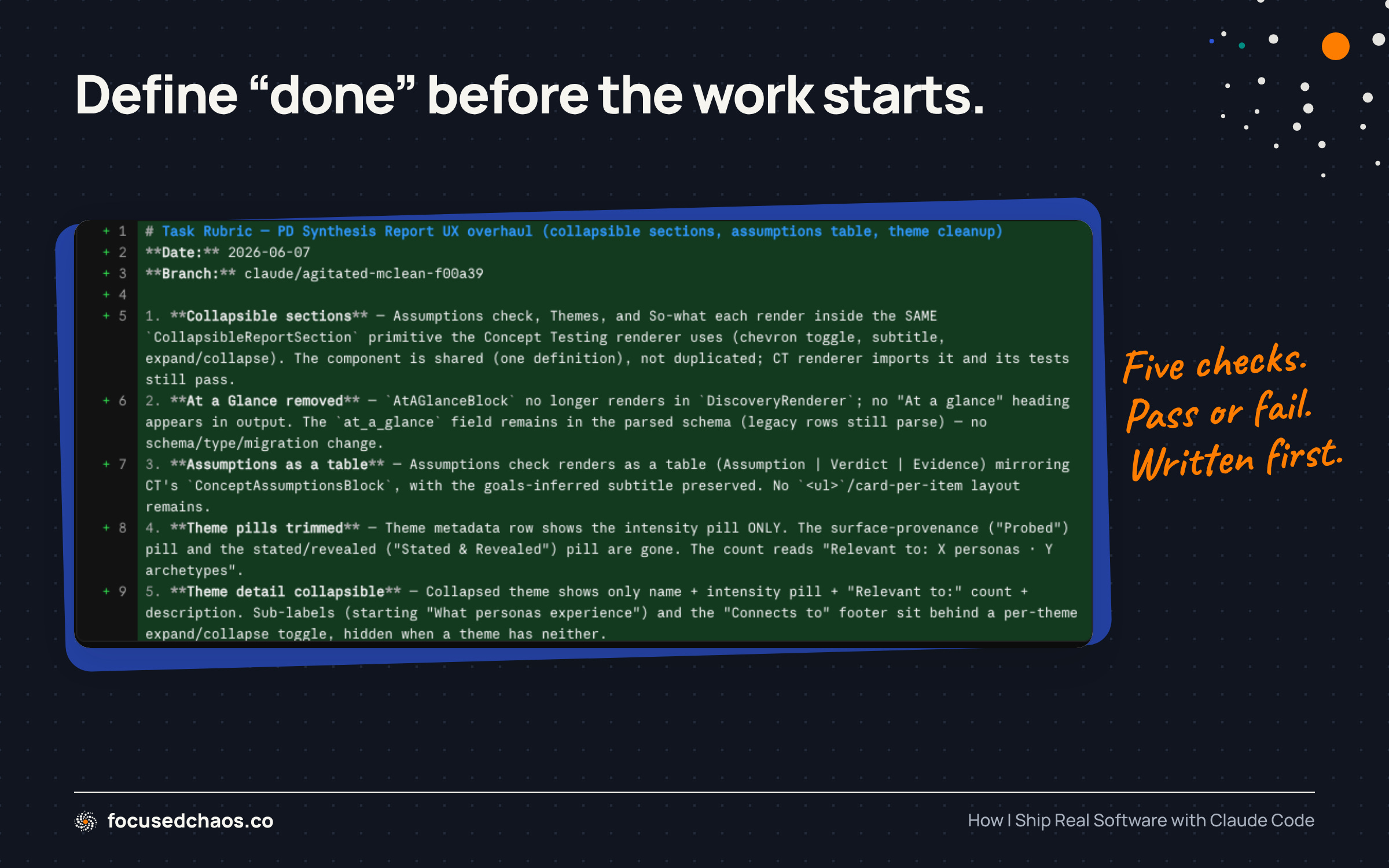
Once I approve the rubric, Claude Code does the work.
Then a separate step (using a separate sub-agent) grades the result against that rubric, pass or fail, one criterion at a time, with the actual evidence cited. If everything passes, great. If anything fails, it stops. It does not quietly patch over the gap and call it done. It tells me which check failed and why, and we go back and re-plan that specific piece.
I built this as a command I run, called /assess. (In my own setup it's actually a "skill," a slightly more capable cousin of a command, but a plain command file does the same job and is the simplest way to start, so that's what I'll show you below.) The discipline matters more than the tool. You’re just refusing to let the AI be the judge of its own work against a standard it invented after the fact.
You don’t need to be a developer to write commands (or skills).
They’re not code. A Claude Code command is just a markdown file you drop in a folder (~/.claude/commands/), and you write it in plain English. The entire /assess command is about half a page. It says, roughly: read the .rubric.md file, run a diff to see exactly what changed, go through the rubric one item at a time and mark each pass or fail while citing the specific line of code as proof, and if everything passes say so and stop. If anything fails, name which check and why, and do not try to fix it. That's the whole thing. The power isn't in clever tooling. It's in forcing that one honest grading step to exist.
A few things I deliberately kept out:
No scoring out of 10. A “7 out of 10” invites a debate with yourself about whether 7 is good enough. Pass or fail is honest.
No letting the AI fix and re-grade itself in a loop. It reports, it stops, I decide. An agent grading and re-fixing itself against a fuzzy standard is how you get a confident mess.
No inventing the rubric afterward. If you didn’t define “done” before you started, there’s nothing to grade against, and the whole point evaporates.
If you’re not technical, this matters even more. An engineer can read the code and determine whether it’s right. I often can’t. The rubric is how I get a real answer without being able to fully eyeball the work myself. It turns “trust me, it’s done” into “the proof is right here, one line at a time.” When something fails, the failure is specific and useful: not “this doesn’t feel finished,” but “the limit isn’t configurable yet, it’s hardcoded.” That’s a thing I can hand right back, in plain English, and get fixed.
What this actually looks like, start to finish
Let me walk through a real feature, end to end. Say I want to add a CSV export to the persona list in Candor.
I don’t have to run every step by hand. A lot of this is wired into the project’s instructions so Claude Code does it on its own. But this is the full sequence, and the specific commands and skills involved.
I describe the feature in plain English. “Add a button to the persona list that exports the visible personas to a CSV.” That’s the whole prompt. In some cases I may write something more robust and include a spec doc or PRD.
It investigates before it builds. Because this isn’t a trivial change, Claude doesn’t start writing code. It produces an Investigation Report first: which files it read, what the change touches, who else calls the code it’s about to modify, and what tests already cover it. A small command I use here, /blast-radius, greps the actual importers, callers, and tests of a file or function, so the report is grounded in real output instead of a guess.
It writes the rubric. The last section of that report is the task rubric, saved to a file called .rubric.md. For this feature: the button appears only when there are personas to export, the CSV columns match what’s on screen, exporting respects the current filter, large lists don’t time out, and no existing list behavior changes. Five yes-or-no checks.
I approve the plan, then it writes the code. I read the plan, not the code. If the plan is wrong, we fix it before a line gets written, which is far cheaper than fixing it after.
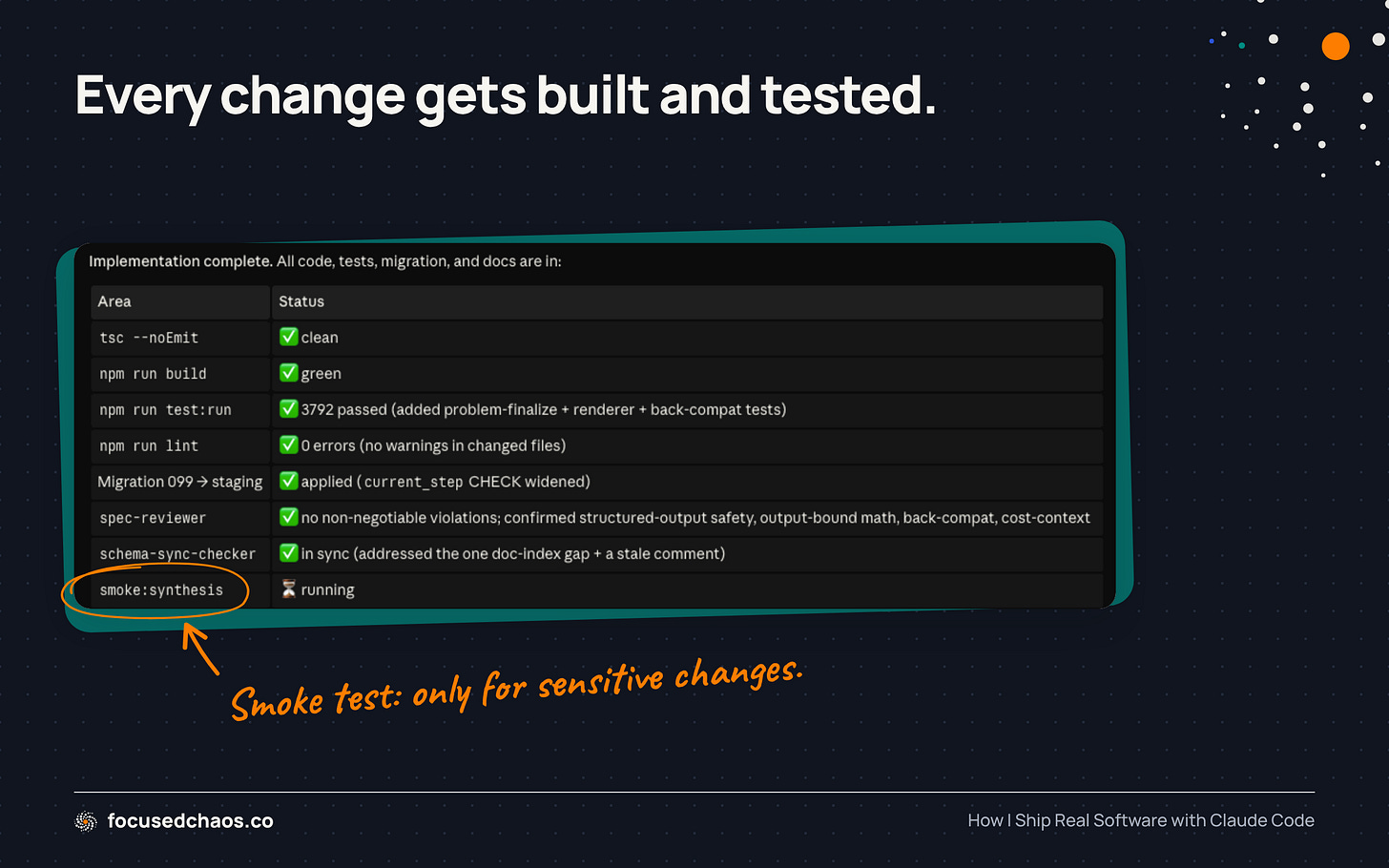
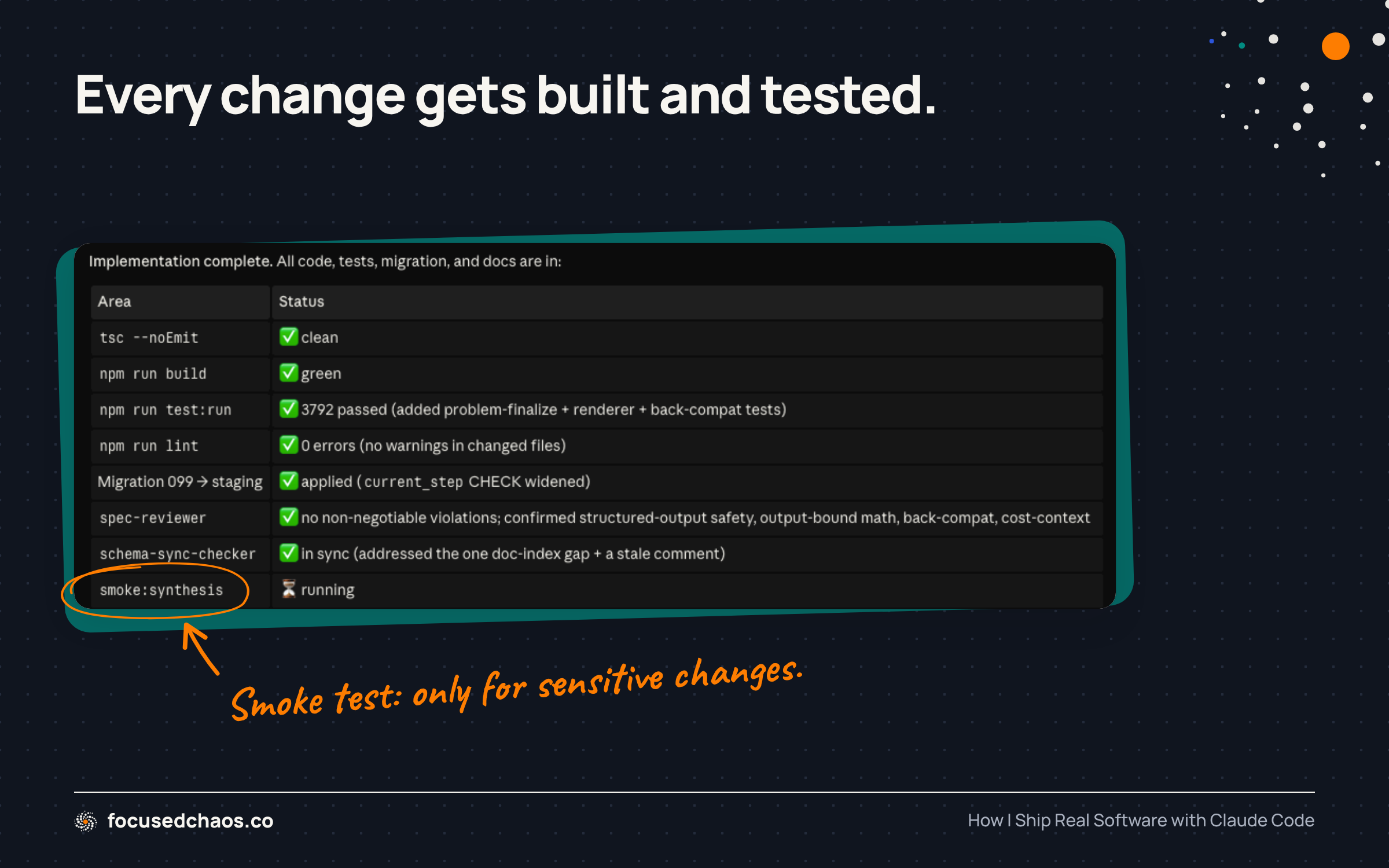
It runs the build and the tests. Standard checks that the project compiles and nothing obvious broke. For changes that touch sensitive parts of the system, it also runs what we call a smoke test, a more expensive check against the real services. The instructions tell it which kinds of changes require that, so it doesn’t skip it and it doesn’t waste money running it when it isn’t needed.
It runs /assess. This grades the diff against .rubric.md. Say the “respects the current filter” check fails, because the export grabbed all personas, not the filtered ones. The /assess command catches it, says so, and stops. It does not commit. We re-plan that one piece, fix it, and re-run /assess. Now all five pass.
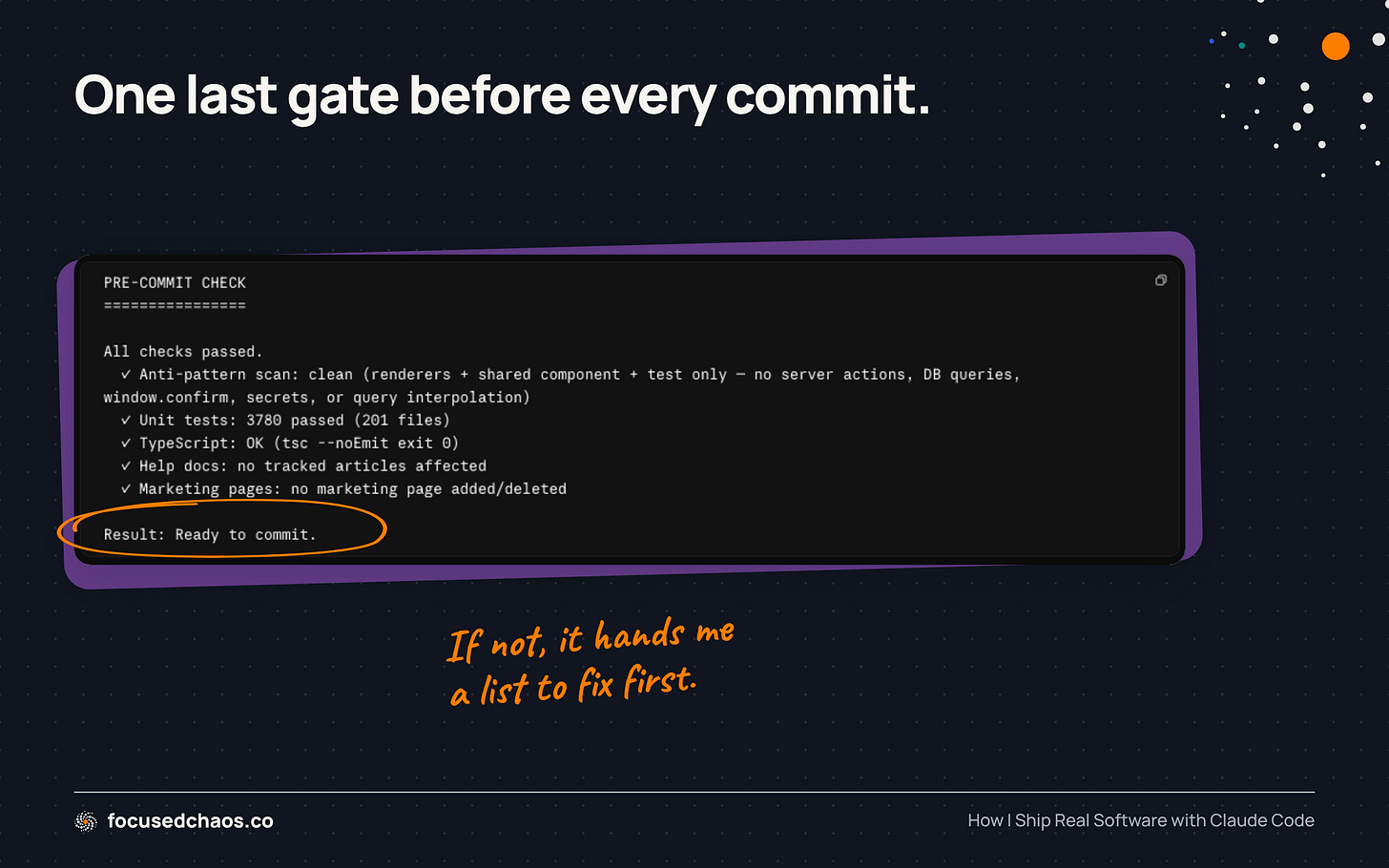
It runs /pre-commit. A broad gate that fires on every commit, built up over time. It scans for the security stuff you never want to ship (hardcoded secrets, a missing permission check), confirms the tests and types still pass, and runs a pile of project-specific checks I've taught it. For Candor that includes flagging when a code change has left one of our help articles out of date, and, when I've touched a marketing page, making sure the SEO basics (sitemap, structured data, an FAQ) are in place before it ships. This time it passes. When it doesn't, it hands me the list to fix first.
It commits and opens a pull request to our staging branch. Staging is our pre-production environment. The PR merges automatically once the automated checks pass, so I’m not babysitting it.
It deploys to staging and I actually click the button. This is the one step no automation replaces. I open the staging site, export a CSV, and confirm it does what I wanted. The rubric tells me the criteria were met. My own eyes tell me it feels right.
I run /session-end. First it checks I haven't left unfinished work lying around that the wrap-up could bury. It won't proceed until that's clean. Then it writes a structured entry to a running SESSION_NOTES file: what got done, what's still in progress, the decisions I made and why, and any open questions for next time. It scans that note for anything sensitive, commits and pushes it, and only then clears the temporary workspace the session used. It refuses to clear that workspace unless my work is provably saved on the server first, so wrapping up can never cost me work. The SESSION_NOTES file has become one of the most useful pieces of the whole setup. It lets me break big work across many sessions without losing the thread, and lets me (or Claude) remember what we did weeks ago without re-reading a pile of code. Next time I sit down, Claude reads the recent notes and picks up where we left off instead of starting cold.
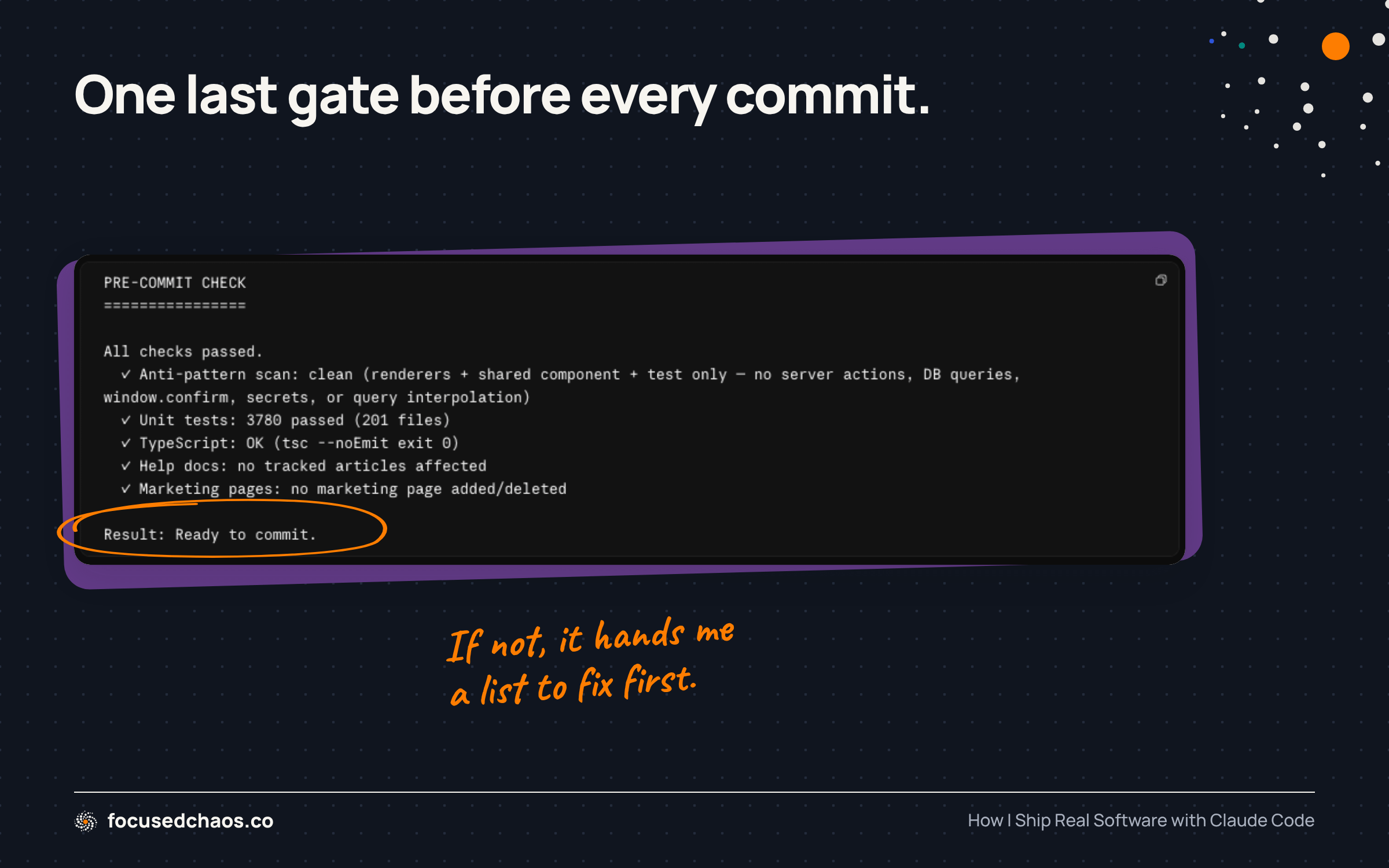
Production is a separate, deliberate step. Staging is automatic. The promotion from staging to live is a human decision I make on purpose. The AI never ships to production on its own.
That’s the whole loop. Plan, build, grade, check, ship to staging, wrap up. The feature took one prompt and maybe fifteen minutes of my attention, and I trust it, because every step had a gate that wasn’t “the AI says so.”
Every so often, a deeper sweep
The loop above runs on every feature. There are a couple additional checks I run once in a while. These are deeper sweeps. (The video quality sucks, but the video is epic.)
The first is called /code-watch. It does a lot at once, which is exactly why it isn’t an every-commit thing.
It makes two passes over recent work. The first is a real security and bugs audit, the kind that hunts for the classic vulnerability patterns: injection, missing authorization, leaked data, that sort of thing. The second grades the code against my project’s own quality rules.
Two lenses, security and quality, in one run. It’s slower and more thorough than the per-commit checks, so I treat it as an occasional deep clean rather than a daily habit: after a stretch of riskier work, before a bigger merge, or just every once in a while to catch what slipped through.
The second is called /project-health.
Where /code-watch audits what I've built, /project-health audits how I've configured Claude Code: whether my CLAUDE.md files have quietly bloated, whether I'm missing an obvious command or guardrail, whether the docs still match the actual code. It's the same instinct, one level up. The tools that build the software need maintenance too, and left alone they drift.
An instruction file that earns its space
A lot of what makes the loop run on autopilot lives in two CLAUDE.md files: one global and one for the project.
Claude Code reads both CLAUDE.md files at the start of every session. They are effectively briefing docs: how we work, what to never do, what the project is.
The global file holds the cross-project stuff: how I want the AI to behave in general, and the “define done before you start” habit that the rubric comes from. It loads no matter what I’m working on. Candor’s project file holds the machinery specific to that codebase: the maintenance protocol that forces an Investigation Report before edits, which changes require a smoke test, which sub-agents to use for reviews, how our branching and deploys work. The project file leans on the global one instead of repeating it.
The temptation with CLAUDE.md files is to stuff everything into them. The trap is that a bloated briefing makes the AI follow instructions worse, not better, because the important rules drown in the noise.
Keep it disciplined with one test for every line: does this shape how the AI thinks, or just tell it what to do?
The “how it thinks” stuff stays in CLAUDE.md and loads every session: behavioral principles, our security posture, the workflow loop. The “what it does” stuff gets moved out and referenced instead of inlined.
For example, Candor’s CLAUDE.md does not contain our architecture write-up, our data schemas, our database schema, or the distilled research that grounds how we model things. None of that is in the file. Instead, the project CLAUDE.md has a short “required reading” section that names those documents and says: before you implement anything in this area, go read these. Claude pulls them in only when it’s actually about to do relevant work, and ignores them the rest of the time.
Same idea for tactical detail like framework gotchas and our UI conventions. Those live in separate rule files that load only when Claude opens a matching type of file, so the front-end rules show up when it’s touching front-end code and stay out of the way when it isn’t.
This isn't something I rigged up. Claude Code supports it directly: a rule file with a short paths: line at the top loads only when you open a file that matches it. The "required reading" pointers work the same way, the documents sit in the repo and get pulled in on demand, not jammed into the briefing.
# CLAUDE.md  (loads every session — short and behavioral)

## How we work
- Before any non-trivial change, write a task rubric to .rubric.md, then run /assess.
- Match existing style. Touch only what the task requires.

## Required reading (pulled in on demand, not pasted in here)
Before working in an area, read the relevant doc first:
- Architecture:  docs/architecture.md
- Data schemas:  docs/data-schemas.md
# rules/frontend.md (loads ONLY when you open a matching file)
---
paths:
- "src/**/*.tsx"
---
- Every list needs a loading state and an empty state.
- Validate money as a finite number before storing it.The result: the always-loaded briefing is short and behavioral, and the heavy detail is one pointer away, loaded on demand. For Candor, that cut the always-loaded instructions roughly in half with no loss of coverage. The deep knowledge is all still there. It just shows up exactly when it’s relevant.
The other thing I’ve learned: treat every rule like it was earned, because it was. Almost every good line in Candor’s CLAUDE.md is a scar from a specific time something broke. The AI truncated a long output once and corrupted a file. Now there’s a rule about output size. A change got shipped from a stale branch and created a mess. Now there’s a rule about how we cut branches. Your instruction file shouldn’t read like best practices from a blog. It should read like a list of mistakes you’ve agreed not to repeat.
Why I didn’t just install someone else’s setup
There are great pre-built workflows out there. Garry Tan, the president of Y Combinator, open-sourced his entire Claude Code setup as gstack, 23 opinionated tools that turn Claude into a virtual startup team. The rubric idea I use came from a framework called SPEAR. My thinking on lean instruction files was shaped by Yanli Liu’s article “The 4 Lines Every CLAUDE.md Needs” and the Andrej Karpathy thread behind it.
I could have just installed gstack and run with it. I didn’t. And I’d push you not to, either.
These aren’t bad. They’re genuinely good. The problem is that grabbing a pile of skills and commands you don’t understand is how you end up with a workflow you can’t debug, can’t tailor, and can’t trust. When something goes sideways, and it will, you’re stuck, because you never understood the system you’re running.
I took the core idea from SPEAR and deliberately modified it to fit my approach. Pass-or-fail instead of scoring out of 10 is my call, and I can defend it, because I worked through why. I read Yanli Liu’s article and fact-checked it against Anthropic’s actual documentation, and several of its specific claims didn’t hold up (it cited hard character limits that don’t exist). The direction was right. The details were wrong. I’d never have known that if I’d just copied it.
Don’t ignore what other people built. Engage with it instead of copying it. I point Claude Code at someone else’s setup, a public repo like gstack or a workflow described in a blog post, and ask it to compare that setup to mine. Where are they doing something I’m not? What gap does theirs expose in mine? Is there an idea worth adapting, and if so, how would it actually fit the way I work? Then we work through the changes together. I get the benefit of other people’s thinking without inheriting a black box, because every change that lands in my setup went through my understanding first.
Doing this work yourself is valuable precisely because you learn how things work. And if you’re a non-developer, that learning is critical. You’re not going to out-code a senior engineer. But you can architect a system good enough to ship real software, as long as you understand it.
Borrow ideas freely. Take other people’s frameworks apart to see how they tick. But build your own version, and understand every piece of it. The understanding is the asset, not the config file.
Where I actually work on the workflow
If I spend close to a third of my time improving the workflow, the fair question is where that work happens. Not in a project directory. That was a mistake I made early.
At first I tinkered with my setup inside whatever I was building. Bad idea. A project folder is for the product. The moment you start drafting half-finished workflow experiments in there, you clutter the project with things that have nothing to do with it, and the AI starts loading your unfinished ideas every session. That’s the exact noise problem the lean-file approach exists to avoid.
So I made a separate place for it. A dedicated folder, its own little repo, with no product code in it at all. Workflow ideas live there until they’re ready.
It runs like a lab. When I get an idea or read someone’s article, I ask Claude to evaluate how it compares to what I already do and whether it holds up. If it’s worth pursuing, I write down the exact change I’d make. Then I either adopt it, in which case it graduates into my real config, or I reject it and keep a short note on why, so I don’t reargue it in six months.
Two things come out of that. My live config only ever holds rules that actually work. And I have a written record of why every rule is there, which matters, because most of them are scars from something that went wrong.
The pieces, if you want them
I put my own setup, sanitized and templated, on GitHub: github.com/benyoskovitz/claude-code-workflow.
This is in no way the world’s greatest workflow, but it’s a start. 😄
It’s not my actual Candor config dumped out. It’s the reusable bones, with the project-specific parts marked for you to replace. A starter instruction file. The /assess rubric skill. The lean-instructions pattern. The session and cleanup commands. And a small “lab” structure for treating your own workflow as something you version and improve over time.
Don’t install it wholesale. That would contradict everything I just said. Read it, take the one or two ideas that fit how you work, and rebuild them yourself so you understand them.
Start this today
If you’d rather not touch my repo at all, don’t. You can stand up the core of this in about twenty minutes.
First, create the rubric command. Make a file at ~/.claude/commands/assess.md and paste in the plain-English instructions (see code block below): read the rubric, diff the change, grade each item pass or fail with evidence, stop and report on any failure, don’t self-fix. That file is your /assess. (Claude Code turns the filename into the command name, so assess.md becomes /assess automatically. No extra wiring.)
You are grading a code change against a task rubric. Do not write or fix any
code. You only read, grade, and report.

1. Read the file `.rubric.md` in the project root. It lists 3 to 5 checks, each
   a pass-or-fail criterion. If the file doesn't exist, say "No rubric found"
   and stop.

2. Run `git diff HEAD` and `git diff --staged` to see everything that changed.

3. Go through the rubric one check at a time. For each, decide PASS or FAIL and
   cite the evidence: the specific file and line that satisfies it, or the exact
   thing that's missing. No "probably fine." If you can't point to proof, it's a
   FAIL.

4. If every check passes, say "PASS, ready to commit" and stop.

5. If any check fails, list which ones and why, in plain language. Do not try to
   fix them. Do not commit. Stop so I can decide what to do next.

Be honest, not generous. The whole point is to catch the thing that isn't
actually done.
You could create this as a more robust skill if you want, which is how I’ve got it setup in the Github repo.
Second, add one line to your CLAUDE.md. Something like: “Before any non-trivial change, write 3 to 5 pass-or-fail checks to a file called .rubric.md, and don’t treat the work as done until /assess grades them all green.” That single rule changes how every task runs.
Third, start a workflow notes file. A plain text file, anywhere outside your project, where you jot the ideas you want to try and what happened when you tried them. That’s the seed of the lab.
The rubric and /assess command together are a powerful combination. Make your AI define “done” before it starts, and grade the result (through separate sub-agents) against that and nothing else. That single habit fixed more of my frustration than anything else I’ve tried.
The people getting the most out of these tools aren’t the best prompters. They’re the ones who treat the workflow around the tool as the actual work, and keep sharpening it.
What rules have you put in your own setup? How are you wrangling Claude Code to be better?