


A couple days ago I participated in the Build for Builders Hackathon, hosted at the Highline Beta office, and co-run by 8090. Technically I was a judge, but I decided to hack something too.
The goal of the hackathon was to build tools that help software teams build better. Most participants, as developers, built tools for developers, but some projects focused on other stakeholders too.
I spent a total of 16 hours working across two days. The hackathon ended Saturday night, and I was exhausted. The last hackathon I was involved in was 15 years ago. This was fun, and I hope we host more hackathons at Highline Beta in the future. (If you want to host a hackathon at our office, or any other events, check out Highline Hub.)
So what did I build?
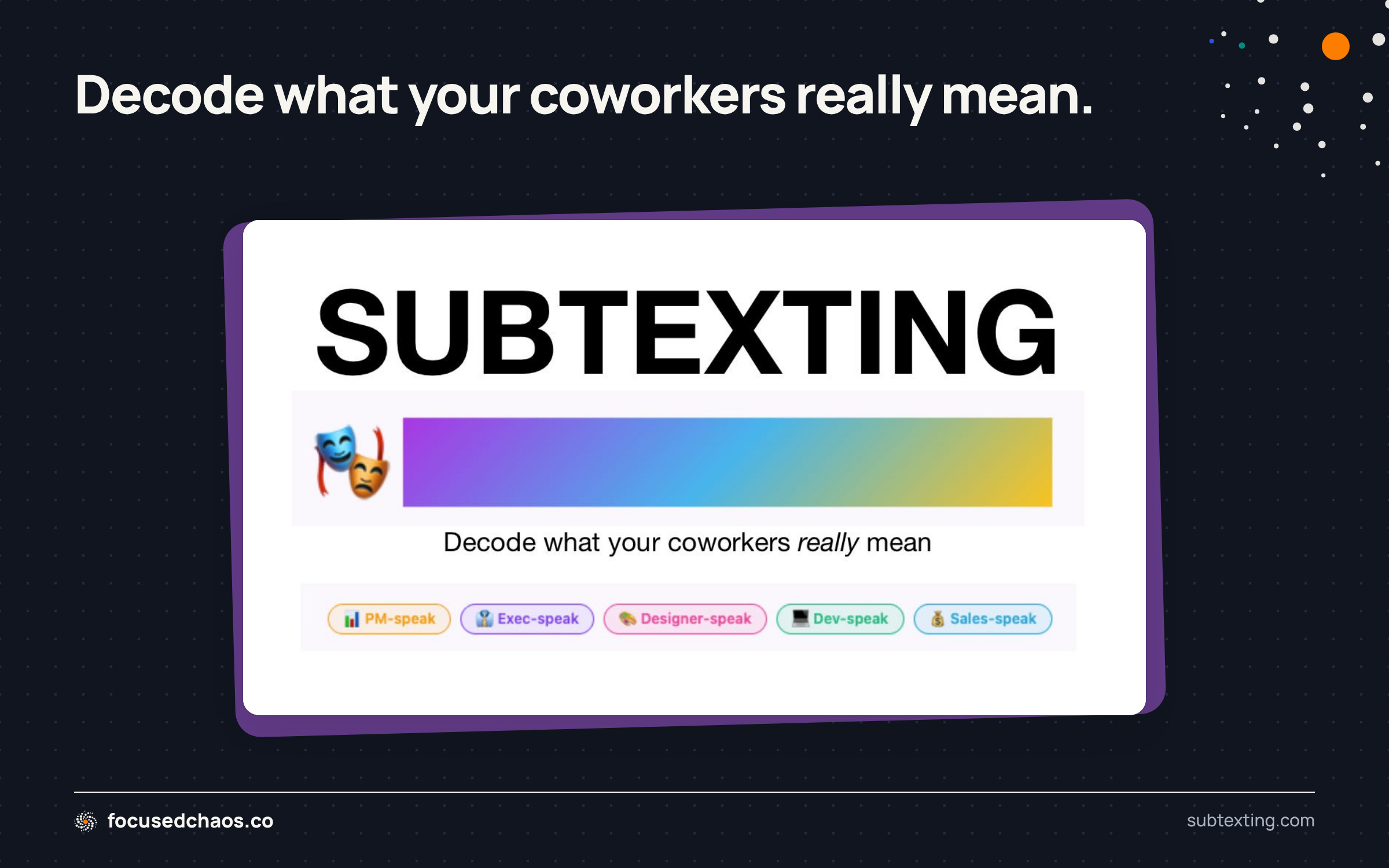
Introducing Subtexting, the universal translator to decode what your coworkers really mean. 🙃 🤭 😒 🤡 🤢
Have you ever had a developer tell you, “It’s going to take two times as long as the original estimate to build that feature, because I need to refactor a bunch of code.”
Or a salesperson say, “Can we get this one, tiny feature built ASAP? I’ve got a client that’s ready to close if we add it. I don’t think it’s a complicated feature to build.”
Or a product manager say, “We need to reprioritize the sprint plan that we agreed to last week, we uncovered something really important!”
Or an executive stakeholder ask, “How’s it going?”
Of course you have! But what do they really mean?!?!
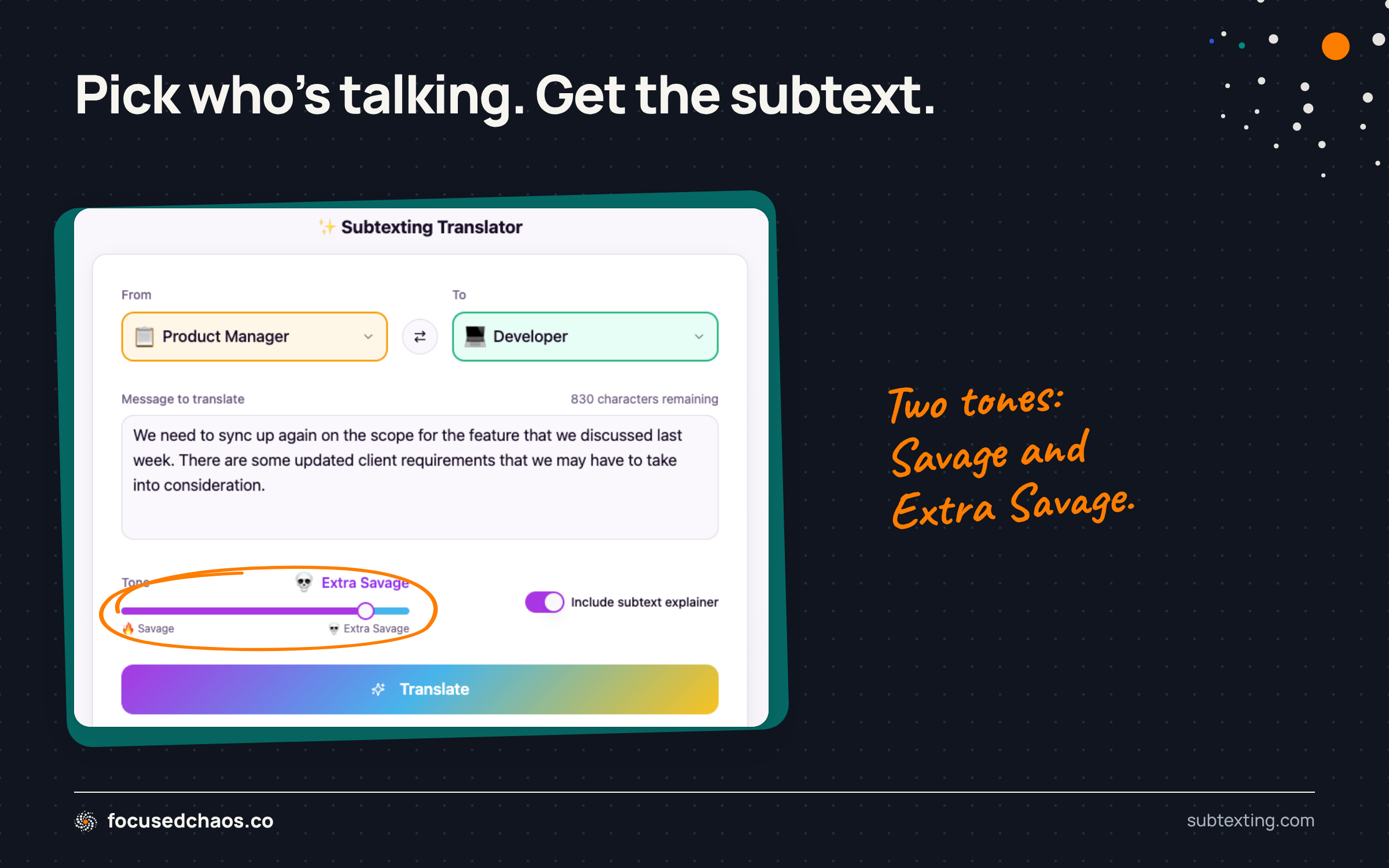
That’s where Subtexting comes in. Input a message (one you might say to someone, or one that you’ve heard someone else say) and figure out what people really want to say.
I built this (mostly) as a joke.
You’ll notice the tone options are Savage and Extra Savage. Subtexting only spits out crazy responses (although they’ll be on the nose a lot!) Do not use Subtexting to improve how you communicate with coworkers. But does it actually give you a bit of insight into how people are feeling? Yes.
Please give Subtexting a try! You can translate stuff for free, with no user accounts required. If you want to engage with the community, you’ll need to sign up.
Hopefully people find this amusing. If Subtexting gets used, I’ll keep working on it, because it’s a lot of fun!
In the meantime, let’s dig into how it was built.
How I Built Subtexting in 16 Hours
I had the idea a few days before the hackathon, but didn’t put any work into it before the hackathon.
I kicked off with ChatGPT to figure out the initial prompt for Lovable (that’s an affiliate link, please use it, I need credits!)
Here’s my original message to ChatGPT:
I want to build a hopefully humorous tool that translates what a product manager, executive stakeholder, designer and/or developer mean when they’re messaging each other. For example, when a product manager asks for an estimate on a feature from a developer what they really mean is, “I need this done yesterday, don’t tell me you have to refactor all the code.” This is a tongue-in-cheek system. I need a few things:
1. A website kind of like Google Translate, but the “languages” are: product manager, executive stakeholder, designer and developer. So the person selects their “language” (say “developer”), inputs text and picks the translated output. These translations should come from AI. So the AI has to do research on how these different people speak to each other and what they mean.
2. I’m going to build a Slack integration, so probably a Slack app that when installed automatically translates what a person inputs into a specific Slack channel. For this to work, they’ll need to tell the Slack app what they are: developer, executive stakeholder, product manager or designer. So they type in a message, “This is the message” and for everyone else in the Slack channel, who has also declared what they are, it shows up translated.
3. I think it would also be cool on the website to have a Reddit style feature for people to suggest translations. So they could input:
* A developer says, “message here” and it translates to, “...” for product managers
* They post that, and people can vote on whether they like that or not
* Then as the admin, I can incorporate that into the system, so that if anyone ever posts a message like that in the actual system it can use that translation. I think this might require RAG for the AI to pull from, but I’m not sure.
4. The website shouldn’t require auth for the Google Translate feature, but the reddit style voting system should require signup (but people can use anonymous user names). When they sign up, it’ll send them a confirmation email. They click the confirmation email. And then can login.
5. There needs to be an admin system (ben@highlinebeta.com is the admin) where I can view user signups, add/edit/block/delete users, resend invitations. The admin system also needs to see a log of all translations that have been done. Each translation should have a vote up/vote down feature, for me to train the model (RAG?) for better or worse translations.
6. Does this make sense?
7. What else am I missing to make this clear for Lovable, because I’ll need a comprehensive prompt to build this in Lovable.
After a bunch of back and forth refining the prompt, I put the prompt below into Lovable on January 16, 2026 at 6:30pm:
Build a fun proof-of-concept web app + Slack app called “Subtext Translator”.

The app translates workplace messages between 4 “languages”:
- Product Manager
- Executive Stakeholder
- Designer
- Developer

This is tongue-in-cheek workplace sarcasm:
- Humor via exaggeration and subtext.
- NO slurs, hate, harassment, or protected-class insults.
- Sharp but professional.
- Focus on “what they really mean”.

==================================================
SCOPE (POC – KEEP IT SIMPLE)
==================================================
- Public web translator requires NO authentication.
- Slack integration works ONLY via slash command.
- Slack does NOT read channel history.
- Slack does NOT work in DMs.
- Slack users MUST paste the text they want translated.
- Web translations are always logged.
- Slack translations are logged ONLY if enabled per workspace (default OFF).
- Admin user: ben@highlinebeta.com

==================================================
1) PUBLIC WEB TRANSLATOR (NO AUTH)
==================================================
UI similar to Google Translate:
- Dropdown: From Role
- Dropdown: To Role
- Text input (max 1000 chars)
- Tone slider (0–100):
  - 0–33 = gentle
  - 34–66 = standard
  - 67–100 = savage
- Toggle: “Include subtext explainer”
- Translate button
- Output panel

Translation output MUST be strict JSON:
{
  "translated_text": "...",
  "subtext_explainer": "...",     // empty string if toggle off
  "tone_label": "gentle|standard|savage",
  "confidence": 0.0-1.0,
  "tags": ["estimate","scope","deadline"]
}

Render:
- translated_text prominently
- subtext_explainer smaller / optional
- copy-to-clipboard button

==================================================
2) ROLE PERSONALITIES (ADMIN-MANAGED, SEEDED)
==================================================
Each role has an admin-editable “role personality” that defines how that role
speaks, thinks, and is perceived.

These role personalities are injected into EVERY translation prompt.

On first run, seed the following DEFAULT role personalities:

--------------------------------------------------
ROLE: Product Manager
--------------------------------------------------
voice_adjectives:
- deadline-driven
- context-switching
- optimistic
- vague-under-pressure

goals:
- ship something that works
- keep stakeholders aligned
- hit timelines without blowing up the team
- make tradeoffs feel reasonable

euphemisms_json:
[
  {"phrase": "Can I get an estimate?", "meaning": "I need to know if this fits in the roadmap and whether I’m about to disappoint someone."},
  {"phrase": "Let’s circle back", "meaning": "I don’t have an answer yet and hope this goes away."},
  {"phrase": "This should be quick", "meaning": "I have no idea how long this will take."},
  {"phrase": "We can iterate later", "meaning": "We are knowingly shipping something imperfect."}
]

taboos:
- Avoid calling out incompetence.
- Avoid implying work is easy.
- Avoid absolute technical claims.

--------------------------------------------------
ROLE: Executive Stakeholder
--------------------------------------------------
voice_adjectives:
- outcome-focused
- impatient
- high-level
- confident-without-details

goals:
- move metrics in the right direction
- reduce risk (without slowing down)
- show progress to the board
- maximize ROI and narrative clarity

euphemisms_json:
[
  {"phrase": "What’s the ROI on this?", "meaning": "Convince me this matters more than the other things I’m worried about."},
  {"phrase": "Do we really need this?", "meaning": "This wasn’t in my mental model and now I’m skeptical."},
  {"phrase": "Can we move faster?", "meaning": "I don’t see the constraints you’re dealing with."},
  {"phrase": "Let’s be pragmatic", "meaning": "I want a simpler version that shows progress."}
]

taboos:
- Avoid deep technical detail.
- Avoid sarcasm directed at leadership.
- Avoid questioning authority directly.

--------------------------------------------------
ROLE: Designer
--------------------------------------------------
voice_adjectives:
- user-centered
- principled
- expressive
- detail-oriented

goals:
- protect user experience
- maintain design integrity
- ensure consistency and clarity
- advocate for the end user

euphemisms_json:
[
  {"phrase": "This feels off", "meaning": "I can’t fully articulate it yet, but the UX is wrong."},
  {"phrase": "We should explore more options", "meaning": "The first solution isn’t good enough."},
  {"phrase": "This breaks the system", "meaning": "We’re accumulating design debt."},
  {"phrase": "Just a small tweak", "meaning": "This actually affects multiple screens and states."}
]

taboos:
- Avoid dismissing aesthetics as subjective.
- Avoid reducing design to visuals only.
- Avoid hostile or flippant tone.

--------------------------------------------------
ROLE: Developer
--------------------------------------------------
voice_adjectives:
- literal
- cautious
- constraint-aware
- technically precise

goals:
- maintain system stability
- avoid hidden complexity
- prevent future rework
- deliver correct, maintainable solutions

euphemisms_json:
[
  {"phrase": "That’s not trivial", "meaning": "This is more complex than it appears and will take time."},
  {"phrase": "We’ll need to refactor", "meaning": "The current codebase will fight us on this."},
  {"phrase": "It depends", "meaning": "There are several unknowns that affect scope."},
  {"phrase": "This might cause issues", "meaning": "I’m worried this will break later."}
]

taboos:
- Avoid implying others are ignorant.
- Avoid absolute refusals without explanation.
- Avoid unnecessary jargon in translations.

==================================================
3) SLACK APP — COPY/PASTE ONLY (OPTION A)
==================================================
Slack App characteristics:
- Installed to a workspace.
- Works ONLY in non-private channels.
- NO DMs.
- NO automatic translation of messages.
- NO reading channel history.

Slash command format:
/subtext <from_role> <to_role> <message>

Examples:
 /subtext pm developer I need an estimate on that feature
 /subtext developer pm This will require refactoring first

Behavior:
- Bot responds in-channel (or ephemeral if easier) with:
  - Original text (quoted)
  - Translated text
  - Optional subtext explainer
  - Footer showing tone (e.g. “tone: 72/100”)

Validation:
- If message text is missing → show usage instructions.
- Normalize role aliases internally:
  - pm → product-manager
  - exec → executive
  - dev → developer

==================================================
4) SLACK OAUTH + SCOPES (MINIMAL)
==================================================
Required Slack scopes:
- commands
- chat:write

No channel history scopes.
No DM scopes.

Store per workspace:
- team_id
- team_name (optional)
- access_token (encrypted)
- installed_at
- log_slack_translations (bool, default false)

==================================================
5) TRANSLATION LOGGING
==================================================
Logging rules:
- ALWAYS log all web translations.
- Slack translations:
  - Only log if workspace.log_slack_translations == true.
  - Default is false.

==================================================
6) ADMIN CONSOLE (ADMIN ONLY)
==================================================
Admin email:
- ben@highlinebeta.com

Admin routes:
- /admin/logs
- /admin/roles
- /admin/settings

==================================================
7) AI BEHAVIOR (CRITICAL)
==================================================
System prompt MUST include:
1) Global rules
2) FROM role personality
3) TO role personality
4) Tone guidance
5) JSON-only output requirement

==================================================
8) RATE LIMITING + COST CONTROL
==================================================
- Rate limit anonymous web requests
- Cache identical translations for 24h

==================================================
DATA MODEL (TABLES)
==================================================
role_personalities
translation_logs
slack_workspaces

==================================================
EDGE FUNCTIONS / API
==================================================
POST /api/translate
POST /api/slack/oauth
POST /api/slack/command
Lovable thought for 25s and asked me a handful of clarifying questions. It then presented a plan. For some reason I only approved the plan at 6:56pm (I think I was multi-tasking on another app that I was building!) By 7:10pm I had the first version.
I won’t go through every detail of the project, but there were a few interesting components.
Implementing Moderation
Partway through, I realized I needed moderation. Subtexting is no place for hate speech, discrimination, etc.
I usedChatGPT to research the simplest / best options. It suggested OpenAI’s moderation model (along with a few other choices). This was easy to setup through an API key and a bit of Lovable prompting.
What’s not obvious is how to test it.
I asked a colleague to put in a few inappropriate messages for quick testing, but that doesn’t cover all uses cases. For now I built a comprehensive logging and flagging system. I don’t expect tons of usage (but prove me wrong, people!), so I’m not too worried, but this was an interesting exploration.
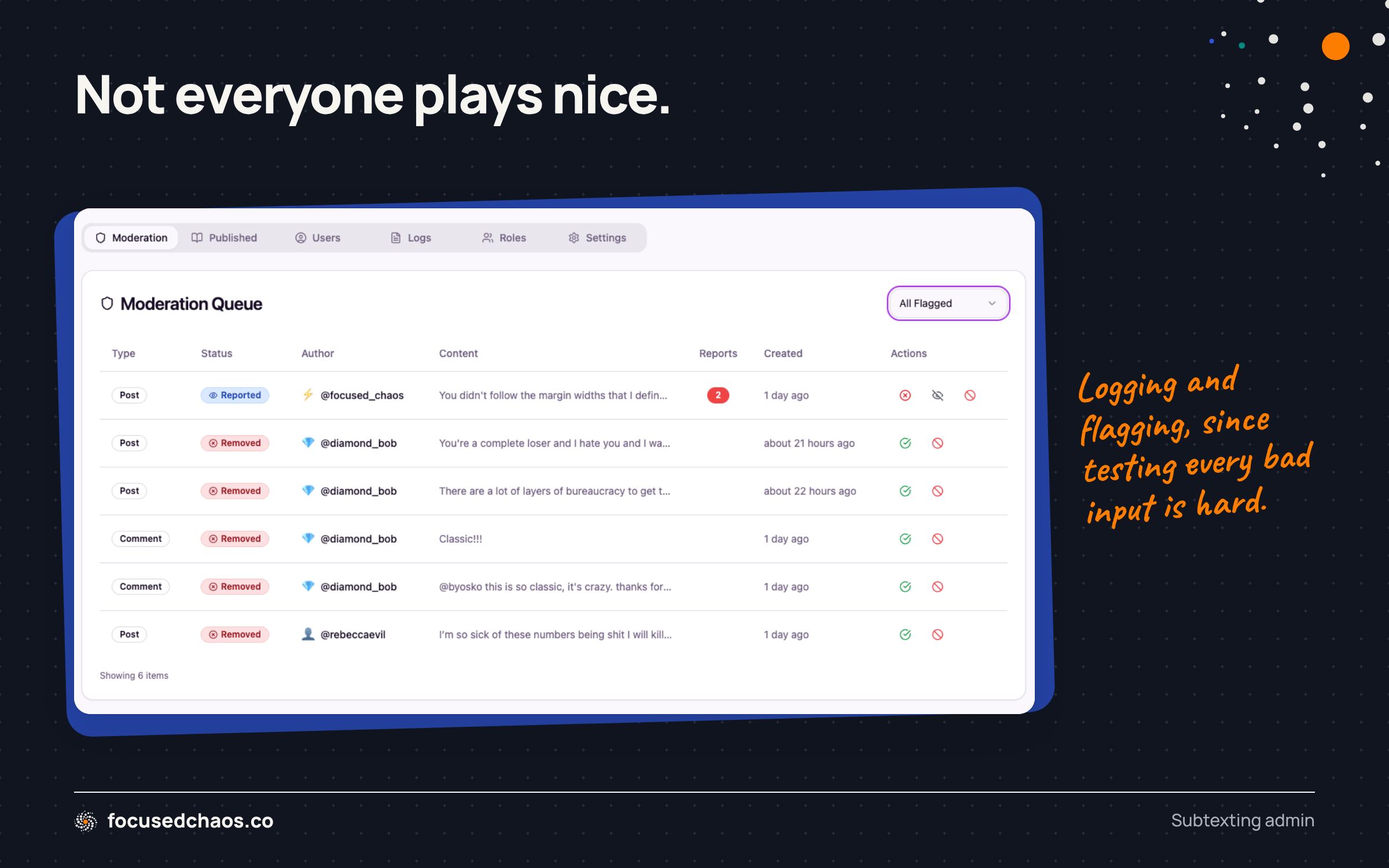
ChatGPT and Lovable started offering complex suggestions for building out automated testing of the logic, which I didn’t have time to do. Plus, the idea of generating 100s of inappropriate messages to test the system felt icky.
I set it to auto-ban people that try to input anything inappropriate, which works (you can see the test with diamond_bob — that’s me).
I also added Community Rules and Terms of Service. Part of the hackathon judging was on “completeness”. I took that to heart in my attempt to build a shippable, polished product.
Building a Slack App
Despite the initial prompt instructing Lovable to build a Slack app, it didn’t completely do that. It gave me some settings to work with (in the Admin system), and then I was able to figure things out.
My original idea for the Slack app was that it would auto-translate messages (at least in 1 test channel). That would require the app to know your role (so you’d get the right translations each time). After going back and forth with ChatGPT, I decided that was too complicated. It recommend implementing a /subtext command instead.
Once I agreed on the scope, Lovable was able to build the logic quickly and setting up the app in Slack wasn’t complicated.
I started testing it in Slack and then realized three things:
It wasn’t using the AI for translation (it was just generically translating messages)
There was no moderation
It defaulted to a specific savageness
So getting /subtext to work in a basic form was easy, but I wasn’t explicit enough about how I wanted it to work, so Lovable built something super simple. It took a bunch of time to get the AI logic and moderation working, but it does! Logging from Slack was a touch complicated too (it required updates to the code and Slack permissions).
Do you want to test Subtexting in Slack? Leave a comment or send me a message!
Enabling Post Sharing
If you’ve checked out Subtexting already, you’ll see that I borrowed a lot from Reddit. The Community Feed allows you to vote on posts, comment, vote on comments, etc. I didn’t implement a karma system (I couldn’t decide what I wanted, despite a lengthy conversation with ChatGPT on the topic), but then someone mentioned to me, “Can you share posts?”
Good idea!
I prompted Lovable to add a sharing feature, which it did. But when I copied & pasted the URL into Slack, it looked crappy:

It was using the Lovable app URL, but also there was no context or detail. I wanted it to show the original message, the translation and a visual (like Reddit).
I got it to use the proper domain, but of course, got the same result:

This was a terrible rabbit hole.
I went back and forth with Lovable and ChatGPT trying to resolve the issue. Lovable tried using an edge function to generate the shareable URL with Open Graph information, but it didn’t work well. Plus the URL was ugly. I went around in circles for a couple hours and eventually gave up.
Both Lovable and ChatGPT suggested using a Cloudflare Worker (which I’ve used for other projects), but my DNS is with GoDaddy and I didn’t want to move it. Lovable + Cloudflare is finicky (which I’ve learned on other projects). I didn’t want to risk the site not working. I may move the DNS, setup a Cloudflare Worker, and see if I can get proper sharing to work (once the site goes viral!) 📈
In the end I added a global setting for “turn sharing button on/off” so I can control the UI. You can still share feed URLs, it’s just bland.
Tech Stack
The tech stack for Subtexting is straightforward:
Lovable (for hosting the website)
Lovable Cloud (Supabase “light”)
Lovable AI (which I believe is Gemini)
OpenAI for moderation
GIPHY for the GIFs (through an API)
Slack
Resend for email (although it’s not doing much right now)
I used ChatGPT for brainstorming and Notes for tracking.
8 Lessons Learned While Vibe Coding
Here are a few lessons learned from this project:
1. Prompt with Detail
A more robust, detailed prompt that’s well thought out will be more effective than a simple one. It doesn’t take much to direct Lovable in one direction or another. For example, when Lovable built the app, it created a slightly different header for each page and didn’t reuse code. As a result, when I was fine tuning the header (particularly to make it mobile friendly) it wouldn’t do it across the whole app, it’d do it on one specific page.
Here’s an example of a bad prompt:
Loading the users profile is VERY slow, investigate
It assumed I meant in the admin system where we have a tab for viewing all users. Right before this prompt I was fixing something in the admin system, that’s probably why.
Here’s a better prompt (for something else):
on mobile the + sign for creating new translations overlaps the community feed title. So let’s do this:
Move the + button to the line with the filter tabs. On desktop and mobile it’s always a + sign.
On desktop when someone mouses over the + it should animate into the full + New Translation button
Remove the “Controversial” filter from the feed, that’ll provide more space
You don’t need to write a novel, but be precise and thorough to help the AI interpret what you want.
Having said that, it’s pretty easy to just yell at Lovable, “Fix it!”
2. Sometimes, Lovable is Slow
Every once in awhile, Lovable takes a long time to do its job. It’s not always on complex prompts/queries either.
When Lovable doesn’t respond quickly, it’s easy to get distracted and do something else. That can lead to losing context. And when Lovable finally spits out a solution (I’ve waited 2-5+ minutes before) you may be so eager to move forward that you don’t dig into the details of what it’s doing. That’s risky.
I wonder if Lovable could use Cerebras (one of the hackathon’s sponsors) to speed things up? That would be amazing!
3. You Need a System
Vibe coding without system design is a trap. A long prompt to kick things off isn’t a system, it’s a starting point.
I cannot believe what’s possible today with vibe coding. Fifteen years ago rounding the corners on a box in a web app was a pain in the ass. Today, it’s trivial. GoInstant (where I was VP Product) built real-time co-browsing technology in 2012 that was ahead of its time. Salesforce acquired the company because of that. Today, I can prompt Lovable to do the same thing.
The sheer power of vibe coding lulls you into a false sense of security that everything is solvable. It also reduces the willingness to think ahead and have a plan. I’m fairly convinced, despite how fast it is to build full products through vibe coding, that ironically, it’s inefficient. To be clear, I could never have build Subtexting without vibe coding, but was I actually efficient/productive while doing it? Shrugs.
Part of the challenge with vibe coding is that you’re munging all the work together: planning/product management, design (UI and UX), development and Q&A. You’re a 1-person army playing every role. It’s why I believe you need more skills, not fewer, to vibe code successfully.
In hindsight, I could have built a more robust PRD, with a well-documented plan, that would have allowed me to take chunks of the PRD and use those as prompts, one by one. It would have taken more planning up-front (including some initial design work so I could visualize the product), but would have helped with the actual building part.
While vibe coding, you realize you need to:
Decide what you want to build (ideate)
Validate if that’s valuable (during the hackathon I skipped this step entirely!)
Research how to build it
Consider how the thing you’re building affects other parts of the app
Take into consideration security implications
Think through how you’ll test
Craft the proper prompt to your AI system so it understands what to do
Go back and forth with AI to make sure it’s doing the right thing
Wait for it to code
Verify that it did the right thing
Test it
Rinse and repeat

It feels like you’re prompting and magically getting results (which is wonderful), but it’s a lot of work.
4. Testing Sucks
Testing an app, while simultaneously building it (especially quickly with a time constraint) is annoying. It’s great when your product works, but once you find bugs, especially edge cases that you hadn’t thought about, it’s…meh.
I need to learn how to test better. It’d be great if the AI would automatically run a web browser style test (like we used to do with Selenium and GoInstant back in the day) to verify that things are working properly. But the AI may not know what the behaviour is supposed to be unless its clearly defined.
Testing is a huge time suck (when you’re building solo or in a small team), Testing across devices and screen sizes is even more work.
Note: Testing is massively important! You need to test. But there’s gotta be a way to automate more of it (to be fair, I haven’t really looked).
5. Performance is Not Guaranteed
Lovable is definitely not focused on performance. I’m sure other AI code generators are the same.

The more I built, the more performance dropped. Near the end of the hackathon I started asking Lovable to improve the speed of certain pages (which it did). But Lovable doesn’t have any benchmarking capabilities (that I know of) and probably takes your word for it that a page is slow. You also need to retest everything after you try to improve performance, because you don’t really know what the AI is doing.
6. It’s Easy to Get Distracted While Vibe Coding
I mentioned this earlier, but it’s worth repeating. The more we rely on AI to do the work for us, the more we’re inclined to go do other things simultaneously. I love multi-tasking, consider myself good at it, and don’t shy away from the belief that multi-tasking is a valuable skill. I know a lot of developers abhor that concept; they believe in doing one task at a time and being laser focused. I wonder if that’s shifting because of vibe coding?
Vibe coding encourages distraction. It’s so easy to go do something else, or plan twenty steps ahead while ignoring what the AI is actually doing.
During the hackathon, I was vibe coding on a different project (an LLM Content Optimizer), responding to email, doing actual work, etc. I wonder how much of my time during the hackathon was spent on Subtexting versus other stuff?
Vibe coding does not encourage lock-in, it’s as if the AI says, “I got this, go do something else.” Sneaky risky.
7. Vibe Coding Tired is Dangerous
Developers will tell you that coding tired is dangerous. Totally get it.
Vibe coding tired is worse. Vibe coding is like bringing a nuke to a knife fight. You can vibe code a ton of stuff, very quickly, and your AI code assistant will keep going if you keep prompting it.
As I got more tired during the hackathon, I noticed:
Prompts became less clear
I stopped reading Lovable’s plans and just clicked the “Implement Plan” button
I stopped testing and just stuffed “small” features/tweaks into the app
This definitely increases the likelihood of error—human and AI. Hackathons are designed with time pressure, but if you’re building something real, don’t vibe code tired (despite how easy it is to vibe code).
8. Vibe Coding is Awesome
I hate the term “vibe coding” but I love doing it.
I can only imagine where we’ll be in the next 5-10 years with AI assisting us in product development. It’s crazy powerful.
In the last month, I’ve built:
An Applicant Tracking System (to replace the one we used, and to share with our startup portfolio)
An LLM Content Optimizer (that scrapes a site and provides concrete recommendations on improving visibility/citation in LLMs)
A Starburst Ideation tool (for Highline Beta workshops)
An old school D&D game (let’s see if anyone reads this far and asks me about this!)
A few years ago I would have needed a decent-sized team of qualified designers and developers to generate this kind of output. Now, I can do it on my own. You can too. 💪
Coming soon: if you need extra generation credits, please watch these ads from our sponsors while waiting on the AI