
Launching Candor: A Synthetic User Research Platform
AI user research helps kickstart validation for problems, concepts, solutions and price tests.

Today, I’m excited to announce Candor.
Candor is a synthetic user research platform built by Highline Beta.
You can join the waitlist today.
Why did we build Candor? A few reasons:
We do a lot of research. Building things is easy. The hard work is the early validation (and then the go-to-market). Candor is helping us do in-depth research quickly. It’s not replacing human interviews. It’s a strong compliment.
We’re all-in on AI. I’ve shared a few posts about my experience building with AI and how to create value with AI features. If you’re not neck-deep in it, you’ll be left behind. Simple as that. I don’t want to be left behind. 😄
We’re experimenting with GTM and new business models. AI is fundamentally changing a lot of things. Go-to-market (GTM) is one of them. How do you acquire users? How do you build a brand? How do you automate things intelligently without it feeling like AI-slop? From a business model perspective, we see the rapid shift in pricing and how software companies have to adapt. It’s a world we’re building and investing in, so what better way to figure it out than to do it ourselves.
I want to explain a bit more about how Candor works, then share some interesting things we’ve done and a few lessons learned.
How Candor Works
Candor is a synthetic user research tool. You create personas and interview them, either manually or automatically. Everything is rooted in our expertise and scientific rigor.
1. Generate an audience
First you generate an audience. Audiences can be B2B or B2C (there are meaningful differences between how these are handled). You fill in some basic information, and can upload documents.
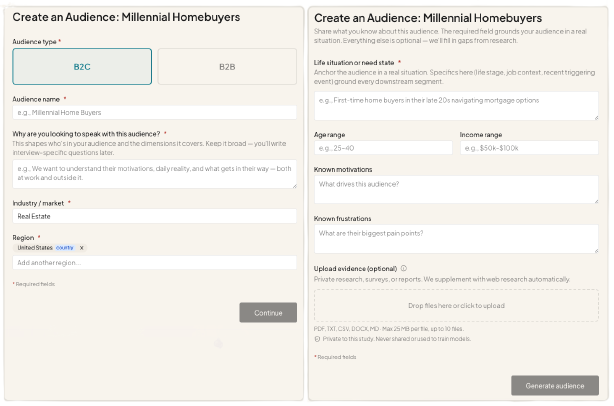
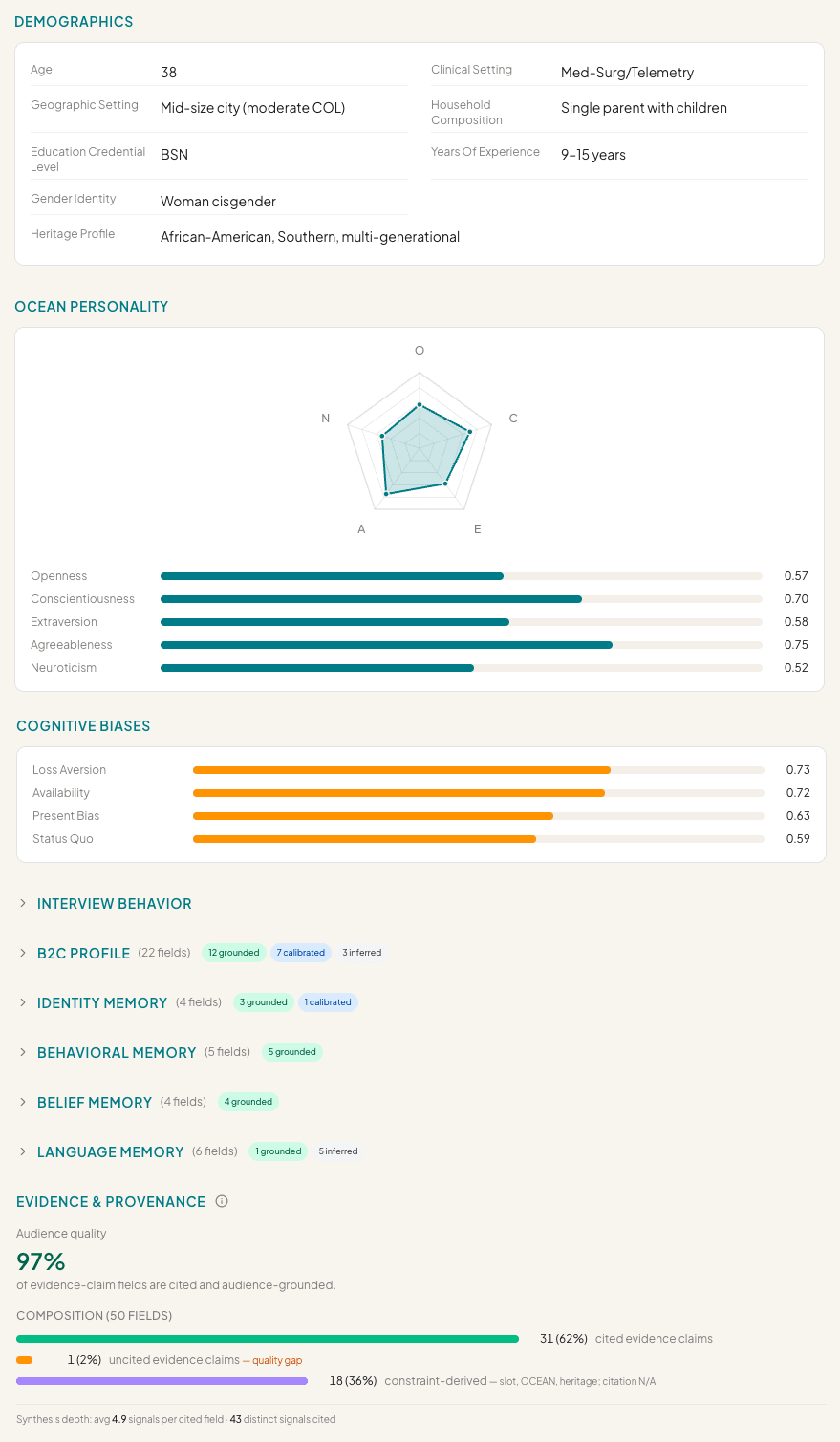
The system does deep Web research and uses your inputs to generate several archetypes/segments. Here’s an example:
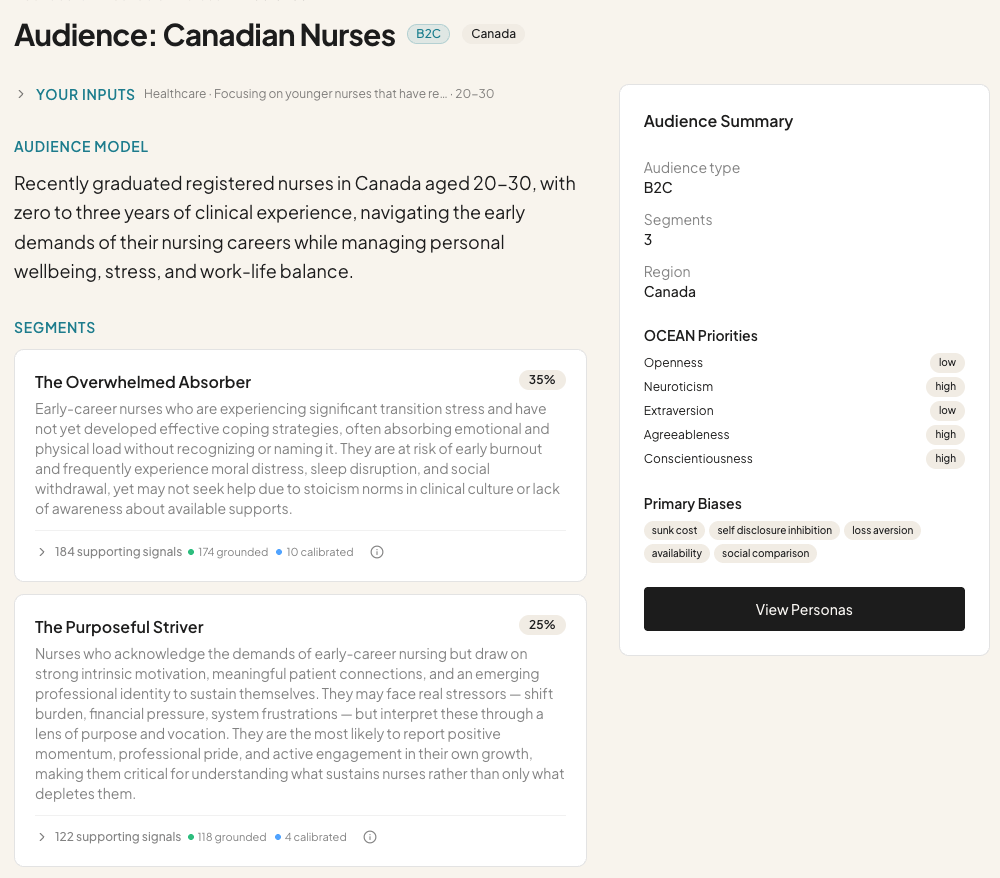
Every pain point, behavior, goal, attitude, belief, preference, etc. is grounded in evidence from your documents and/or Web search.
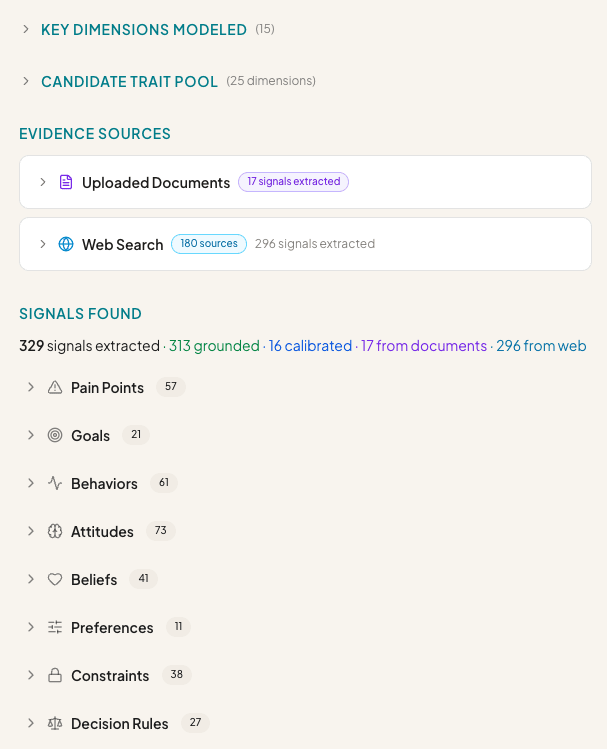
The goal is to build personas from a very in-depth, fundamentally grounded base.
2. Generate personas
Next you generate personas. These are the actual “people” you interview.
Persona generation is equally in-depth and validated. Everything that’s generated is reviewed by a critic. You can double click into the details, or jump into interviews.
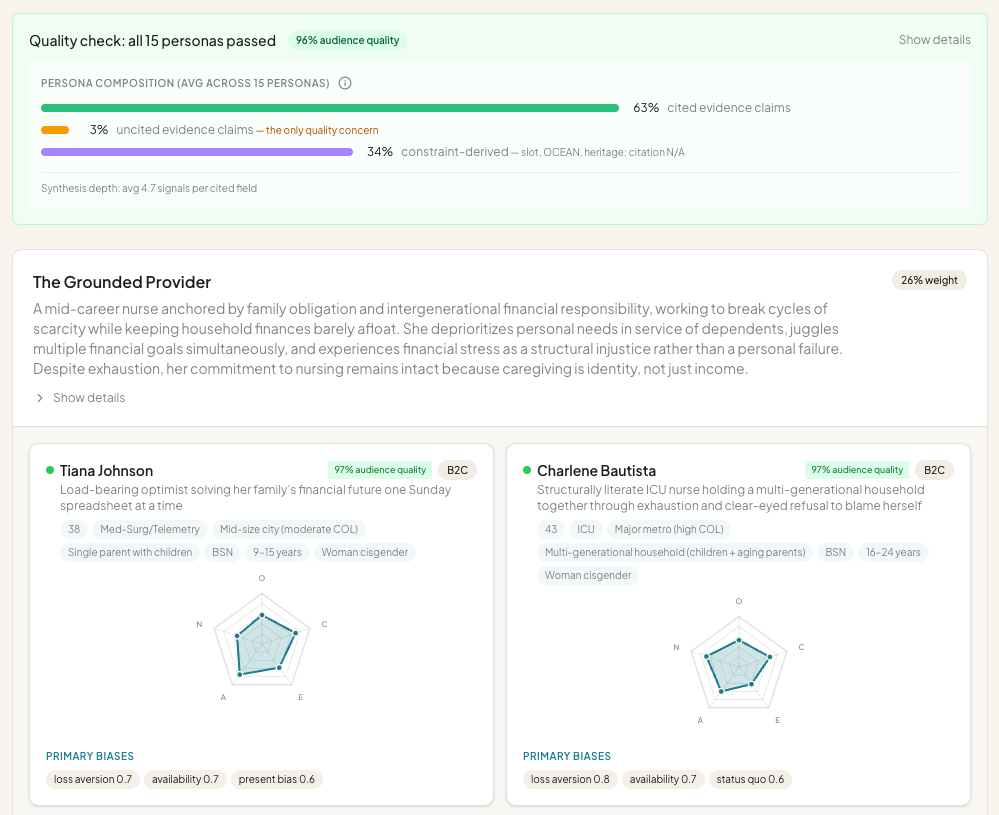
Each persona has a ton of detail. We spent a lot of time on this part, ensuring that the personas are robust. This goes well beyond what you get from simulating conversations in ChatGPT or Claude.
3. Create an Interview Guide
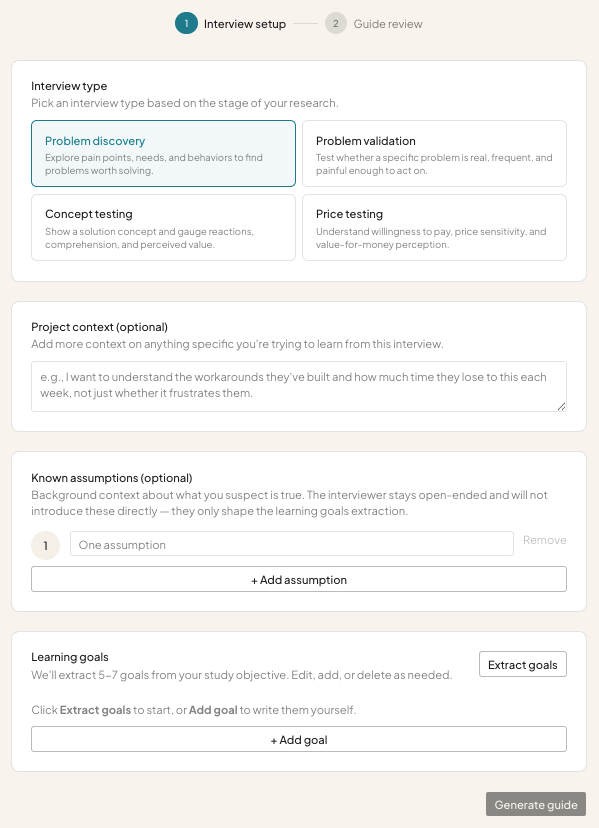
Once you have personas, you create an interview guide. There are four basic types: Problem discovery, Problem validation, Concept testing & Price testing.
Each requires different inputs and generates different learning goals. From there, Candor creates an interview guide and allows you to automatically interview the personas. Or you can manually interview personas and chat with them as you see fit.
4. Synthesis
Once interviews are complete, the system runs a detailed analysis and generates a synthesis report. The report highlights everything you need to know (at a glance or in depth) to move forward.
I know that was a lot to go through, but I wanted to highlight Candor’s ease of use, along with the underlying sophistication.
Next Steps
We’re putting Candor through its paces and will open it up to early testers soon.
If you’re interested, sign up on the waitlist.
You can also follow Candor on LinkedIn.
Our goal is to launch within a month or so. There’s a lot of work to do on refining the product and experience. We also have to implement a business model.
Beyond Candor’s Core Product Features
Building a production-grade product involves more than its features. I want to share a bit more about those experiences.
Candor’s Website
Not surprisingly, Candor’s site is designed by and mostly written by AI.
I’m not in love with the site’s design, but I did use VoltAgent’s awesome-design-md to kickstart the process. It helped me identify similar brands to take inspiration from. I now have a couple design-related Claude Skills for future projects too.
For content, I used my own SEO/AEO experience and fed Claude Code with best practices, so it could structure the site and create key anchor pages. Some examples include Use Cases, Comparison, FAQ and Glossary.
I then used Kyle Poyar’s Claude Skills to refine the copy. I found /icp-sharpener was quite helpful. I combined the output from ICP sharpening with domain expertise from Anthony Pierri to rewrite the copy.
One last thing: The screenshots on the website are AI generated. They’re accurate images, but composites of a few features. Claude Code and I decided which images would resonate, and then it built them for me. This took a bit of work, but it was still easier than taking screenshots of the product and having to mash everything together in Figma or another tool.
Candor’s Help Files
Candor already has a bunch of help files (although this isn’t complete). They’re generated by AI; reviewed by me.
Claude Code went through the code base to structure the help files intelligently and write them.
The coolest thing is that help files get automatically updated when the product changes. This is done through a Claude Skill I created called /pre-commit, which I run before committing code.
The pre-commit skill does a few things, including running standard tests, verifying security issues and checking to see if help files need updating. It will tell me which help files need changing, write the changes, and give me an opportunity to review. As a result, help files should never be outdated and the site’s content gets frequent updates.
This is a great example of how AI can speed up the development process, including “around the edges” where things are often forgotten. Integrating help file management into the AI coding process is an easy win.
The Admin System
Every software product has an admin system for managing users, updating settings, tracking performance, etc. Historically this has been a pain in the ass to build: it can take a lot of time and it doesn’t provide users/customers with value. But without it, you can’t manage things properly.
Using Claude Code, I built a robust admin system very quickly.
I asked Claude Code to identify SOC2 compliance requirements, so we could build the necessary infrastructure. Candor isn’t SOC2 compliant yet, but the underpinnings are there. For example, it has a robust audit log of everything that’s done. It also tracks what admin users are accessing. This is “boring stuff” but super important.
Candor’s admin system has full account and user control.
Multi-factor authentication is built in (required by admins, configurable for regular users)
Email templates are fully customizable
Failures are monitored and reported in real-time
And more…
One of the more interesting aspects of the admin system is the cost management part:
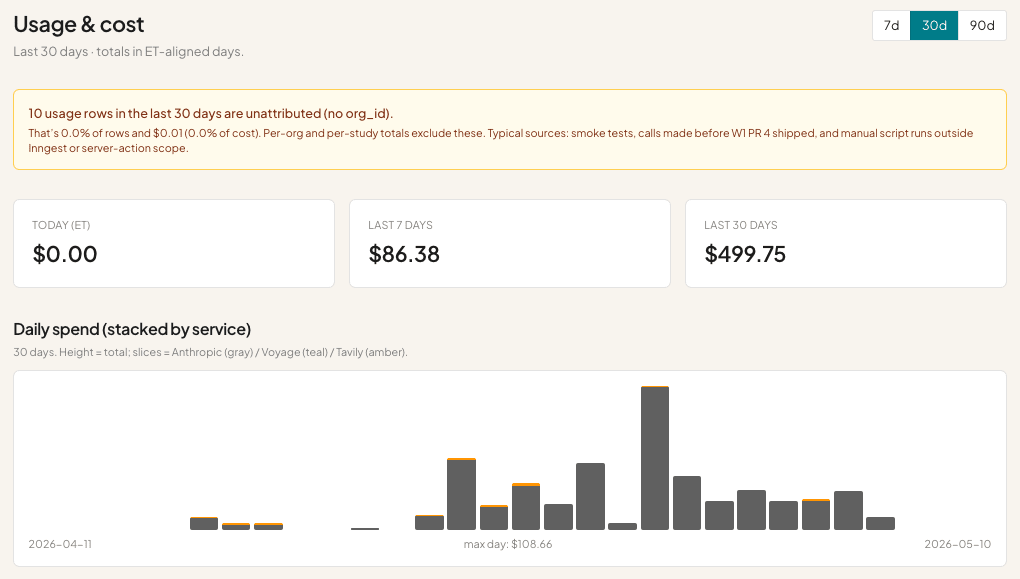
Almost every action in Candor costs money, because it’s heavily reliant on LLMs. In the last 30 days I’ve spent $499.75 testing!
Cost tracking is a huge part of building a successful AI product. You have to know what costs money, how much, how frequently those features are used and by whom.
Your power users could bankrupt you.
I wrote about AI business model shifts here: Lean Analytics, Reconsidered.
Candor’s cost management system tracks every action and its cost. It slices the data by user, project and feature. I know what it costs to generate interviews, run reports, create audiences, etc.
This should help me create a reasonable business model to cover my costs, provide customers with maximum flexibility (I don’t want to restrict usage significantly) and maintain a margin.
I’m not focused on optimizing LLM costs yet. Claude Code did occasionally recommend using cheaper models for certain tasks, so there’s some cost optimization built in. But more can be done.
Lessons Learned Building Candor
Candor is the first production-grade AI product we’ve built at Highline Beta (for ourselves). It’s teaching us a lot.
1. PRDs & feature building can get out of control
The more you feed an AI code assistant tool (like Claude Code) the more it’ll do. But it’s also easy to get overwhelmed. I would never recommend that you build a “massive, feature-rich product” in one sitting. It’s better to eat the proverbial elephant one bite at a time. But it’s so alluring to write a gigantic PRD, try to think of every detail, feed it into Claude Code and watch the magic happen.
Thankfully, Claude Code will chunks the work, but it’s still up to you to deploy and test things piece by piece, review what’s going on, and encourage / force Claude Code to iterate. Otherwise…it’ll just keep building.
Vibe stuffing is a legitimate risk.
Candor already does a lot. After showing it to a couple people, guess what they said? “Very cool, but you could also do X and Y and Z…”
AI + vibe coding is encouraging everyone to build more. But more doesn’t always equal value creation. When building was hard, we had to be a lot more disciplined about what we built. Today that’s out the window unless you’re really pragmatic and careful.
Lessons learned:
Don’t over plan. Focus on designing the minimum first, testing it, sharing it with others, and then adding new things.
Don’t over build. Launch early and often. It’s why we’re releasing Candor now; otherwise we could spend the whole time building.
2. Invest meaningful time in building better systems
When you want to build production-grade, scalable software, you need the right infrastructure to do so.
I use the term “infrastructure” loosely, but some things to consider:
Code quality: Claude Code (and others) are great at software development, but they make mistakes. I’ve gotten into heated discussions with Claude Code about drift or being lazy. You need systems to vet code quality, so you can hold your AI code assistant accountable.
Performance: One person testing the product is a lot different from 5 people using it simultaneously, or 20, or 200, or 2000. You need to engage with your AI code assistant about performance, otherwise it won’t get prioritized. I’ve had multiple discussions with Claude Code about what we’ll need to do as users onboard, although to be honest, I don’t know what will happen.
Tests: Every software developer will tell you that tests are important. But if you’re not a developer, you won’t know what kind or how to build them properly. Code quality tests are usually pretty basic and not enough to catch actual bugs. Candor has a variety of smoke tests that run, which simulate workflows, but even that’s not enough.
Staging vs. Production: Many people will vibe code and push changes to their live system on the fly. I’ve done it, but it’s risky. For Candor, I implemented a staging environment. If you’ve never worked as a developer it’s not something you might think about. But managing dev, staging and production is important to minimizing risk.
Lessons Learned:
The key is that you need the right systems to do the job. Vibe coding can be completely ad-hoc or very structured. The more serious you get, the more serious your infrastructure needs to be.
I spend a meaningful percentage of my time on these issues. Probably 25-30%. I’ve spent entire “sprints” (1-2 weeks of time) on hardening the infrastructure, so that Claude Code is better/smarter, my hosting is more robust and error logging is in place.
3. Build and learn at the same time
You do not need to be a software developer to vibe code a quality product.
You do need to be willing to learn best practices.
You do need to pay attention to what your AI coding tool is doing so you’re not simply agreeing to everything blindly.
If you don’t learn along the way, you won’t get better. If you don’t get better, you can’t guide your AI coding tool to be better.
Lessons learned:
Read (most of) what your AI coding tool spits out. Ask it questions. Challenge it. I often ask Claude Code to explain things in plain English, because it’s getting too technical for me.
Focus on pattern matching. You need to build up your instincts around how to do things, so you can implement the right systems. Instincts = patterns.
Don’t vibe code tired. It leads to laziness, which increases the odds of mistakes or failures.
Don’t leave sessions unattended for too long. When you return to a session a couple days after starting it, I can almost guarantee you won’t remember what was going on. You were letting Claude Code run wild and now you don’t know how to pick things back up. You’re better off doing smaller, discrete sessions, ending them and moving on.
Learn how to use the tools. AI coding tools are insanely powerful. You need to learn how to use them, shape them and build systems for yourself and the tools to do what you want. Don’t just install Claude Skills blindly. Ask Claude Code to tell you what they do, why you might need them, how you could use them. Do your research. Spend a meaningful portion of your time learning, not coding.
We’re going to continue developing Candor and sharing our experience.
If you do any form of user research, please check it out and join our waitlist!
Excited to see how this grows and impacts early stage validation and testing!